The End of Manual Typing: How WOW is Redefining Expense Tracking in 2026
4 min read
We’ve all been there: you’re walking out of the grocery store, carrying heavy bags, and suddenly remember you need to split the $45 bill with your roommates. In the past, you’d have to drop your bags, open your phone, wait for an app to load, find the right group, manually type the amount, select the payer, and hit save.
In 2026, we believe your time is too valuable for that.
Today, we are thrilled to announce a massive update to Who Owes Whom (WOW) that completely eliminates the friction of group expenses: Native AI Voice Tracking and Zero-Friction Home Screen Widgets.
🔗 How to Keep a Shared Travel Budget: 5 Proven Hacks
🎙️ The Magic of AI Voice Expenses: Speak, Don’t Type
Imagine just telling your phone what you bought, and letting artificial intelligence handle the rest. With our new AI-powered voice engine, you no longer need to follow rigid templates or manually categorize every receipt.
Simply say:
“I bought beers and chips for 500 hryvnias for the Odessa 2026 group.”
Our advanced natural language AI instantly understands:
- The Amount: 500
- The Currency: UAH (hryvnias)
- The Description: Beers and chips
- The Group: Odessa 2026
Smarter Group Matching
We know that AI can sometimes make mistakes, especially when you have groups with similar names (like “Odessa” and “Odessa 2026”). We’ve engineered a Smart Group-Matching Algorithm that completely eliminates AI hallucinations.
If there is an exact match, the expense is instantly assigned. If you say something ambiguous, the AI won’t blindly guess and mess up your balances. Instead, it securely saves the expense as an Unassigned Draft, allowing you to quickly select the correct group later. No mess, no stress.
⚡ Smart Widgets: Zero-Friction Tracking from Your Home Screen
Voice tracking is great, but what if you didn’t even have to open the app to use it?
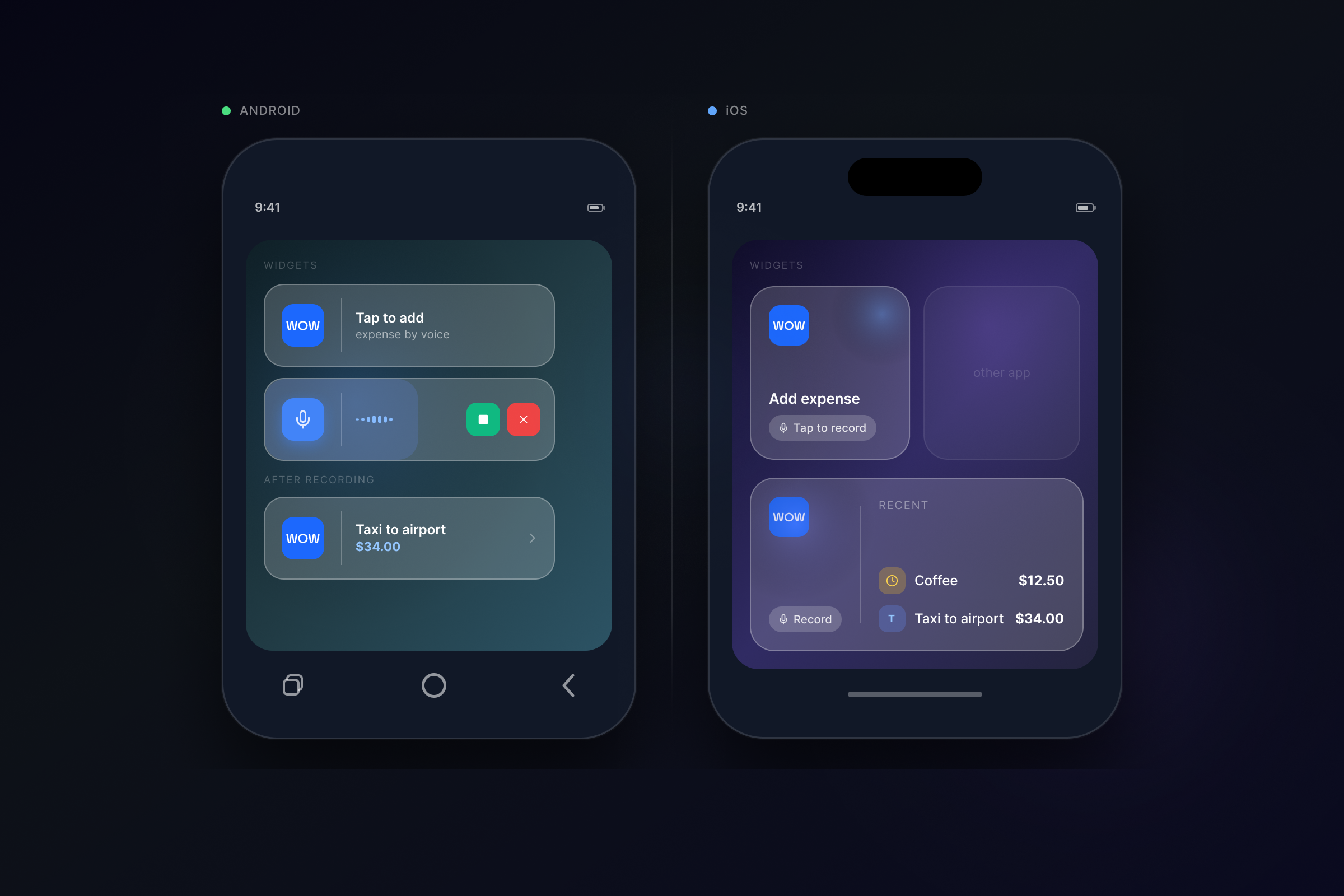
With the latest update, WOW introduces beautiful, interactive Home Screen Widgets for both Android and iOS.
For Android: True Background Recording
Our Android widget is a game-changer. You can now tap the microphone icon on your home screen and start talking immediately. The app doesn’t even need to open! You can log your expenses completely hands-free while walking, driving, or carrying groceries.
For iOS: Instant Listen Mode
For our Apple users, tapping the iOS widget launches the app instantly into “Listening Mode.” It’s incredibly fast and gets you from thought to logged expense in less than two seconds.
If you record an ambiguous expense, our new Draft Preview Sheet pops up immediately, letting you resolve the group assignment with a single tap.
🏆 WOW vs. The Legacy Apps (Splitwise & Tricount) in 2026
If you are looking for a Splitwise alternative in 2026, the choice has never been clearer.
While legacy apps like Splitwise, Tricount, and Settle Up continue to force users into slow, manual data entry—or require clunky third-party Telegram bots for automation—WOW integrates next-generation AI natively.
Legacy Apps (2026)
Splitwise, Tricount, etc.
- ❌ No Native AI Voice
- ❌ No Home Screen Widgets
- ❌ No Smart Drafts
- ⚠️ Aging interface
Who Owes Whom (WOW)
Next-generation AI native
- ✅ Native AI Voice Entry (NLP)
- ✅ Home Screen Voice Widgets
- ✅ Smart Ambiguity Drafts
- ✅ Modern, Premium, Fast
We aren’t just building another bill-splitting calculator; we are building an intelligent financial assistant that gets out of your way.
🔗 Best Bill Splitting Apps in 2026
Ready to Stop Typing?
The future of expense tracking is hands-free. Update your app to version 1.0.8 today, add the WOW widget to your home screen, and try logging your next coffee run with just your voice.
Have feedback on the new AI? Reach out to us on social media and let us know what you think!
Try the AI Widgets Now

